For vendors

Get approved once, then run every order from one place.

Receive purchase orders by email, submit invoices in the vendor portal, and keep your profile current for the families who find you.

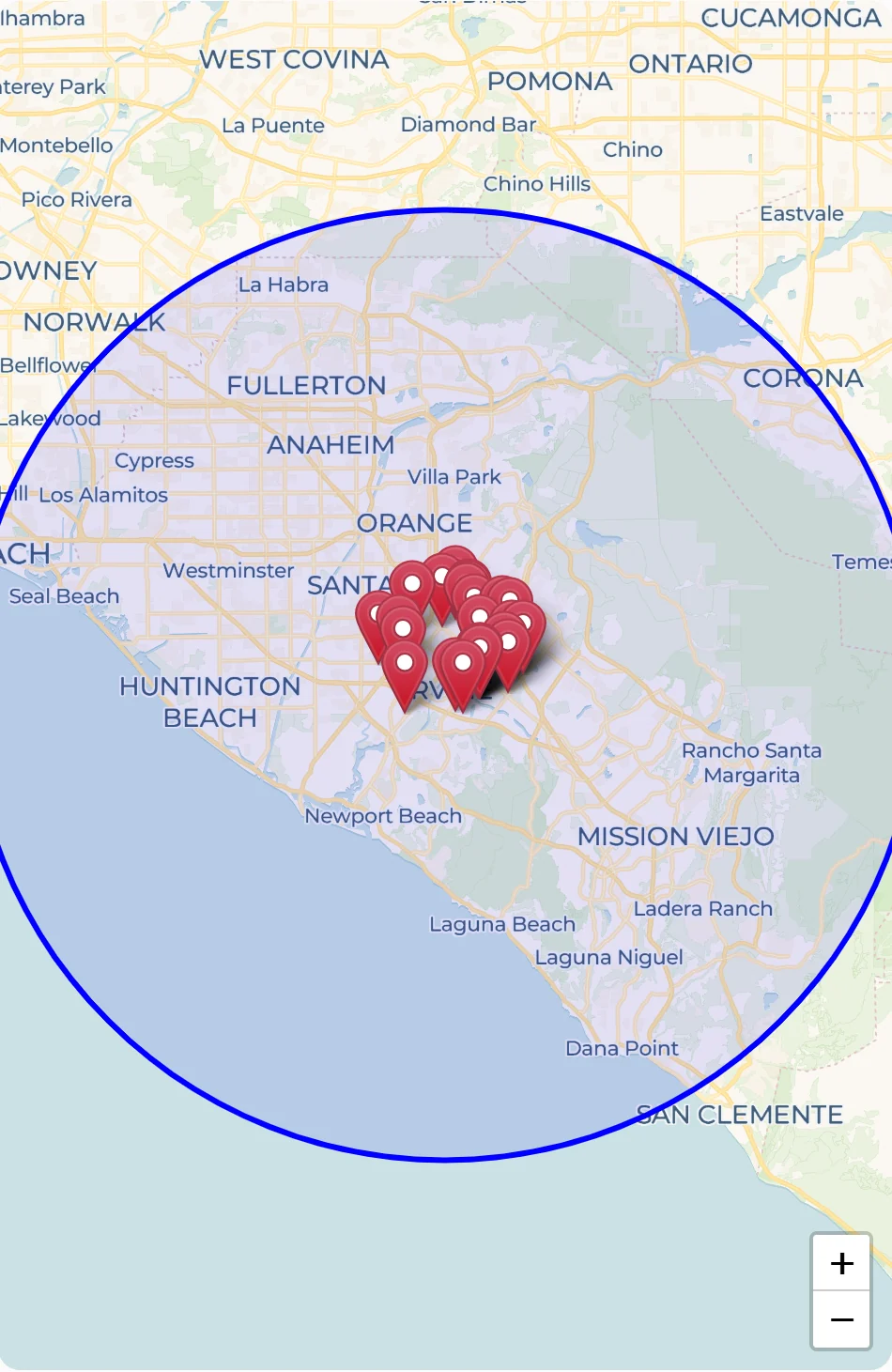
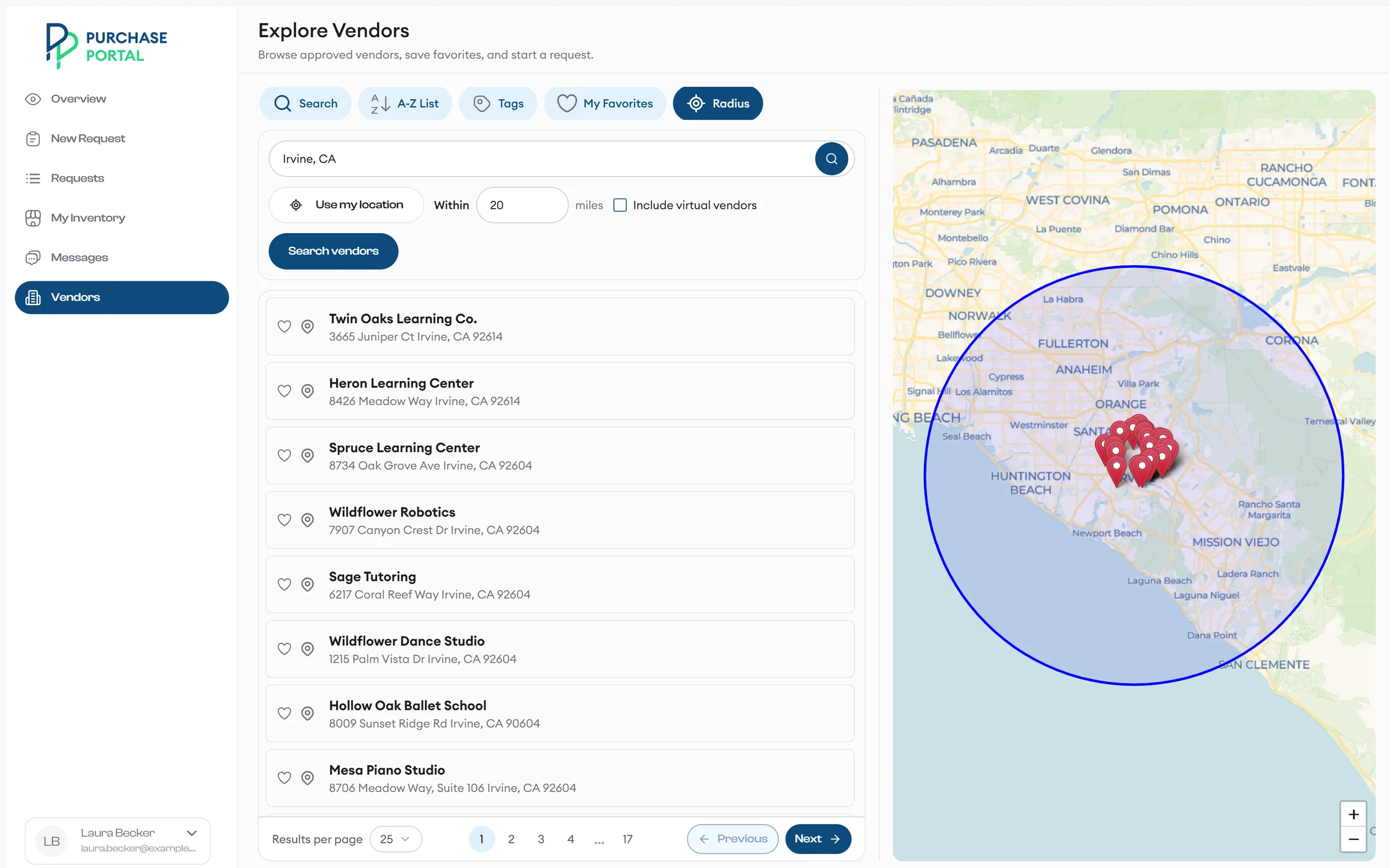
A family's Explore Vendors search lists approved vendors within 20 miles and pins each one on a map.
Familiesfind you by distance, tag, or name

A day with Purchase Portal

From invitation to invoice, in the vendor portal

Invitation-based onboarding

Apply from a secure link, no password needed

Open the unique link in your invitation email. You don't need an account or password to apply.

The guided application asks for your business name, website, EIN, vendor type, in-person or virtual service, contact details, mailing address, and portal login email. You answer relationship questions, choose a background check pathway, and add bank details. Your progress saves automatically.

  1. Vendor Pre-ScreeningYour invitation link stays valid for 30 days.
  2. Vendor ApplicationThe application link stays valid for 60 days, and your progress saves as you go.
  3. Background check pathwayChoose Live Scan or ORI.
  4. Approved, and in the vendor portalA processor reviews your application, and you sign in with your portal login email.
New Purchase Orders

See new work the moment it's approved

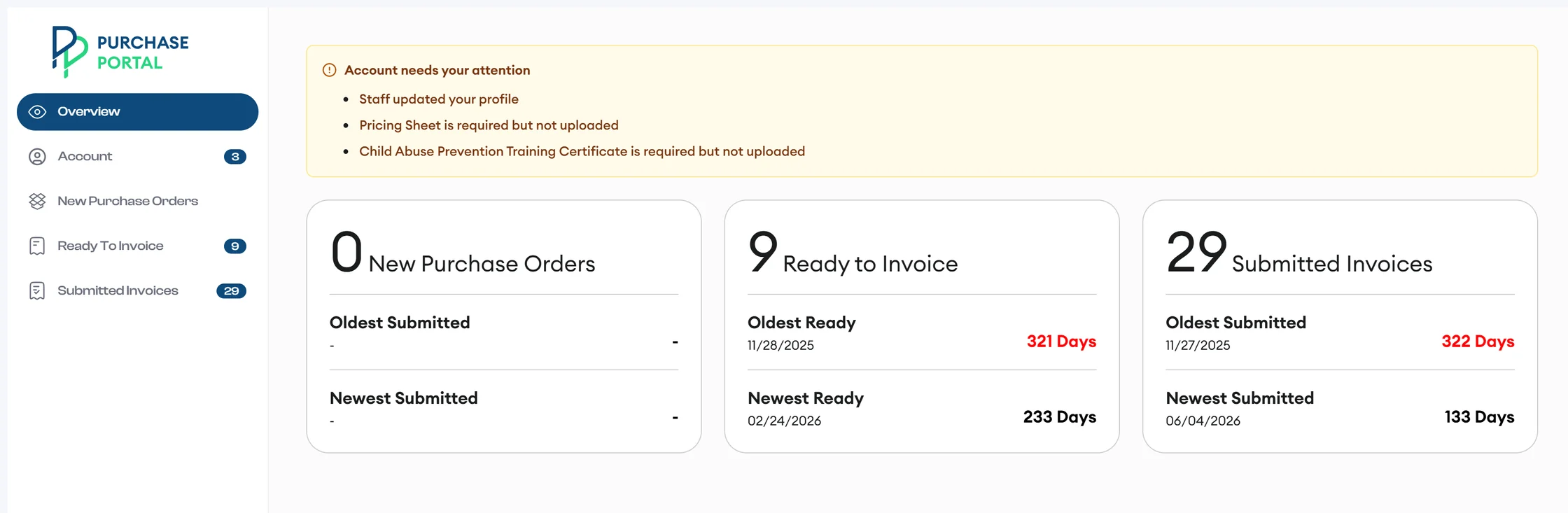
Each new purchase order arrives by email with a Download button. In the vendor portal, Overview counts your New Purchase Orders, Ready to Invoice, and Submitted Invoices, with the oldest and newest dates for each.

Open any PO in a new tab, or download it as a PDF.

The vendor portal Overview lists account items that need attention, then counts New Purchase Orders, Ready to Invoice, and Submitted Invoices with the oldest and newest dates for each.
Ready To Invoice

Invoice exactly what's billable today

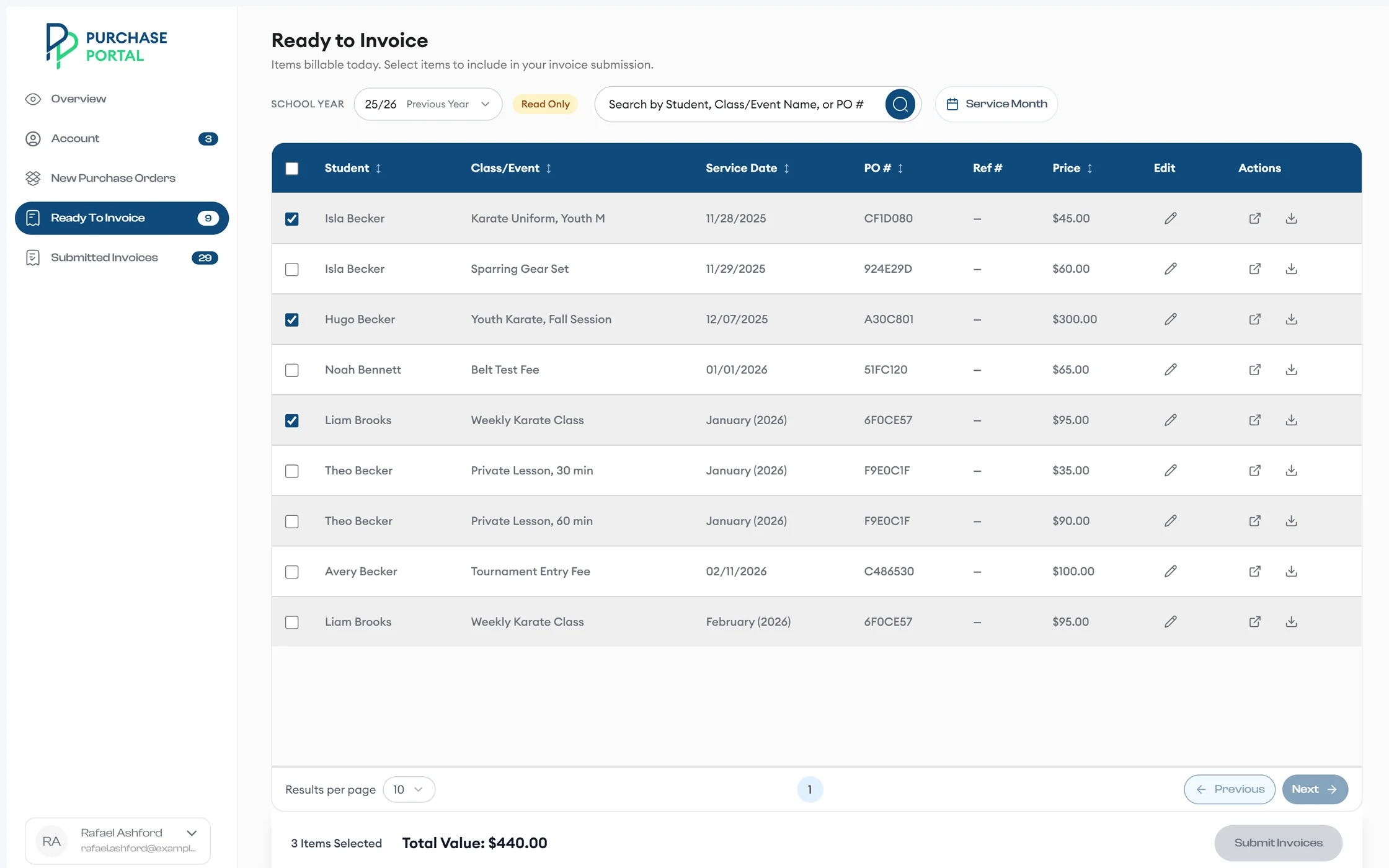
Ready To Invoice lists the items you can bill today. Select items, edit the invoice details, and submit them with Confirm & Submit.

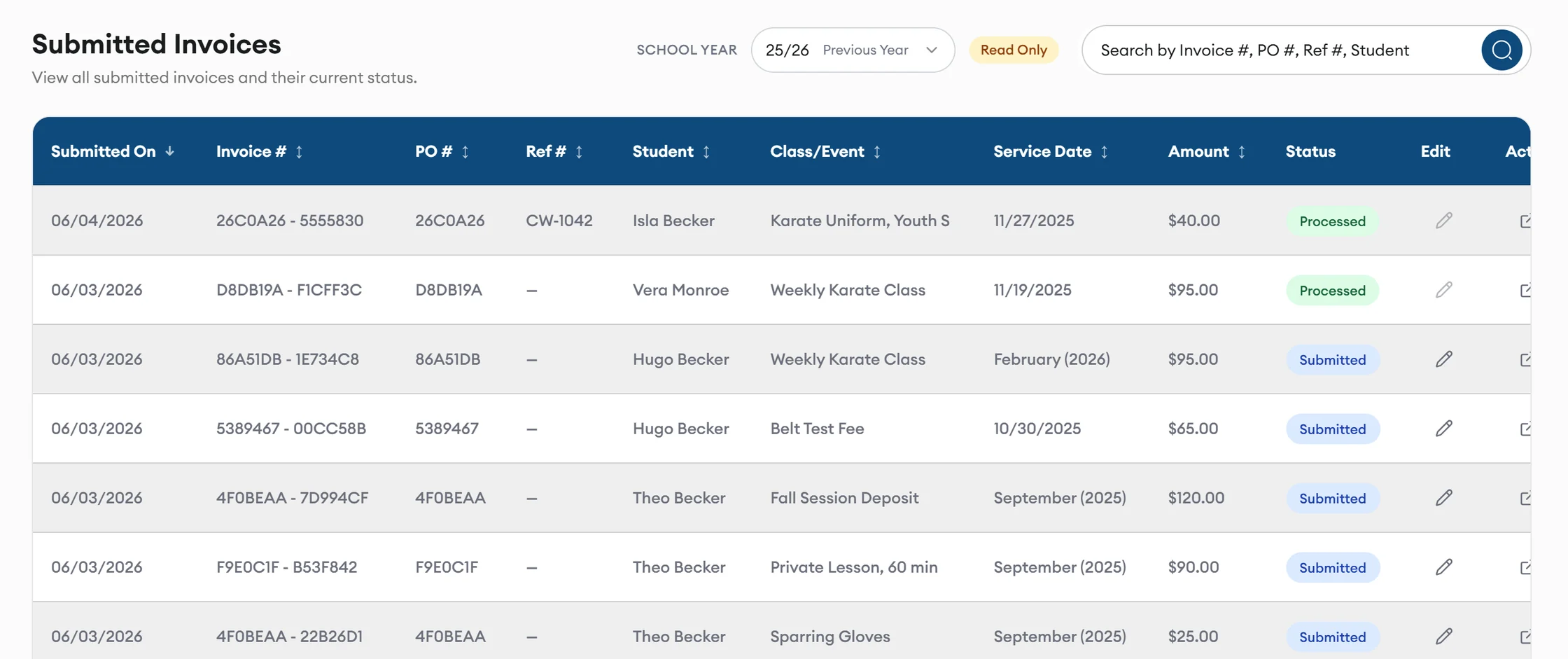
Track every invoice in Submitted Invoices, and search by invoice number, PO number, reference number, or student.

Ready to Invoice lists billable classes and items by student, service date, and PO number, with three items selected and a running total above the Submit Invoices button.
Submitted Invoices shows each invoice's number, PO, student, class, amount, and a Processed or Submitted status, with search by invoice, PO, reference number, or student.
Visibility to families

Be found by families who need you

Families find you in the vendor directory by name, tag, location, or virtual service. They see your website, public notes, ordering instructions, and tags.

A family's 20-mile search radius shows nearby approved vendors as pins on a map.
Account

Keep your profile current, with changes the school reviews

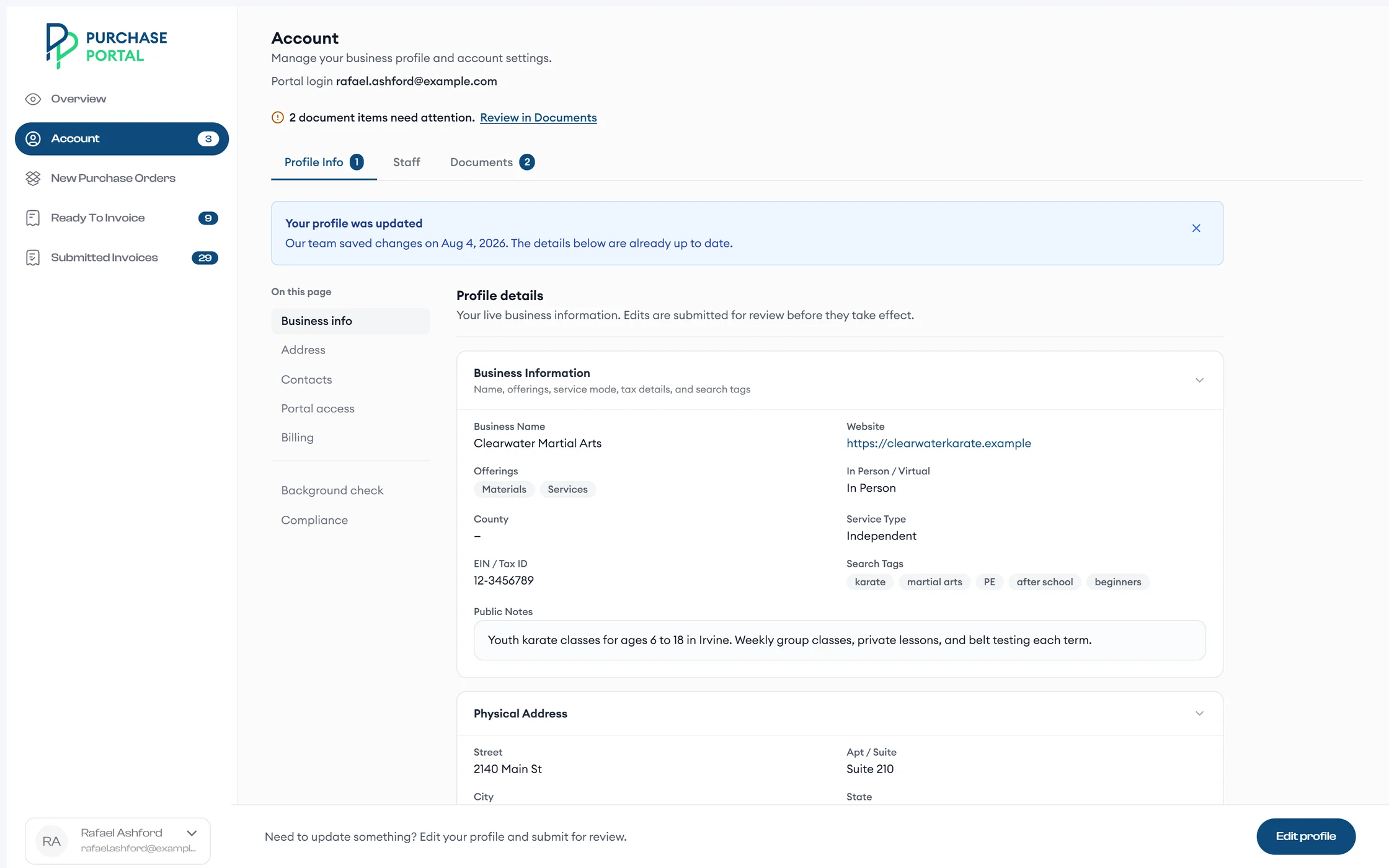
Manage your business profile, staff, and documents under Account › Profile Info, Staff, and Documents.

The school reviews profile and bank changes before they take effect, and you can withdraw a pending change.

A vendor's Account page shows Profile Info, Staff, and Documents tabs, two document items that need attention, a note that the program updated the profile, and the live business information with search tags and public notes.
Account shows your live profile, what needs your attention, and when the program last updated your details.

More of what the vendor portal handles

  • Secure login changes Change your portal login email, and the app sends a verification link to the new address. Your business contact and PO routing emails stay the same.
  • Account status alerts A banner on Overview shows when your account is paused or inactive, with the steps to resolve it.
  • Two ways to invoice Submit invoices in the vendor portal, or email them to the program mailbox.
  • Staff and documents Keep your staff list and documents current under Account.

What happens after you invoice

  1. You You submit an invoice In the vendor portal, or by email to the program mailbox.
  2. Processor A processor matches it AI proposes a match for each line, and the processor accepts it.
  3. Processor It goes to accounting Matched invoices are batched and exported.
  4. You You see the status Every invoice's status shows in Submitted Invoices.

Questions vendors ask

How do I become a vendor?

Send the short interest form below. Applications start from an invitation link that a program sends you.

Do I need an account to apply?

No. Your invitation link is all you need. Pre-screening links last 30 days, and application links last 60 days.

How do purchase orders reach me?

Each new purchase order arrives by email with a Download button, and it appears under New Purchase Orders in the vendor portal.

Can I email invoices instead?

Yes. Submit them in the vendor portal, or email them to the program mailbox.

What happens when I change my bank details?

The school reviews profile and bank changes before they take effect. You can withdraw a pending change.

How will I know if my account is paused?

A banner on Overview tells you, and it lists the steps to resolve it.

Become a vendor

Tell us about your business

Send this short form so we know about your business. Applications start from an invitation link that a program sends you.

How you serve families

By sending this form, you agree to our privacy policy.